

An interesting journey through the Internet's simplest commands
At Newroco, we believe technology becomes much more interesting when people understand how it works. This is why we have Education Corner. We try to post interesting things about how the internet, technology, websites, and apps work.
Our enthusiastic specialists prepared a simple infographic that answers a question most of us never think to ask aloud:
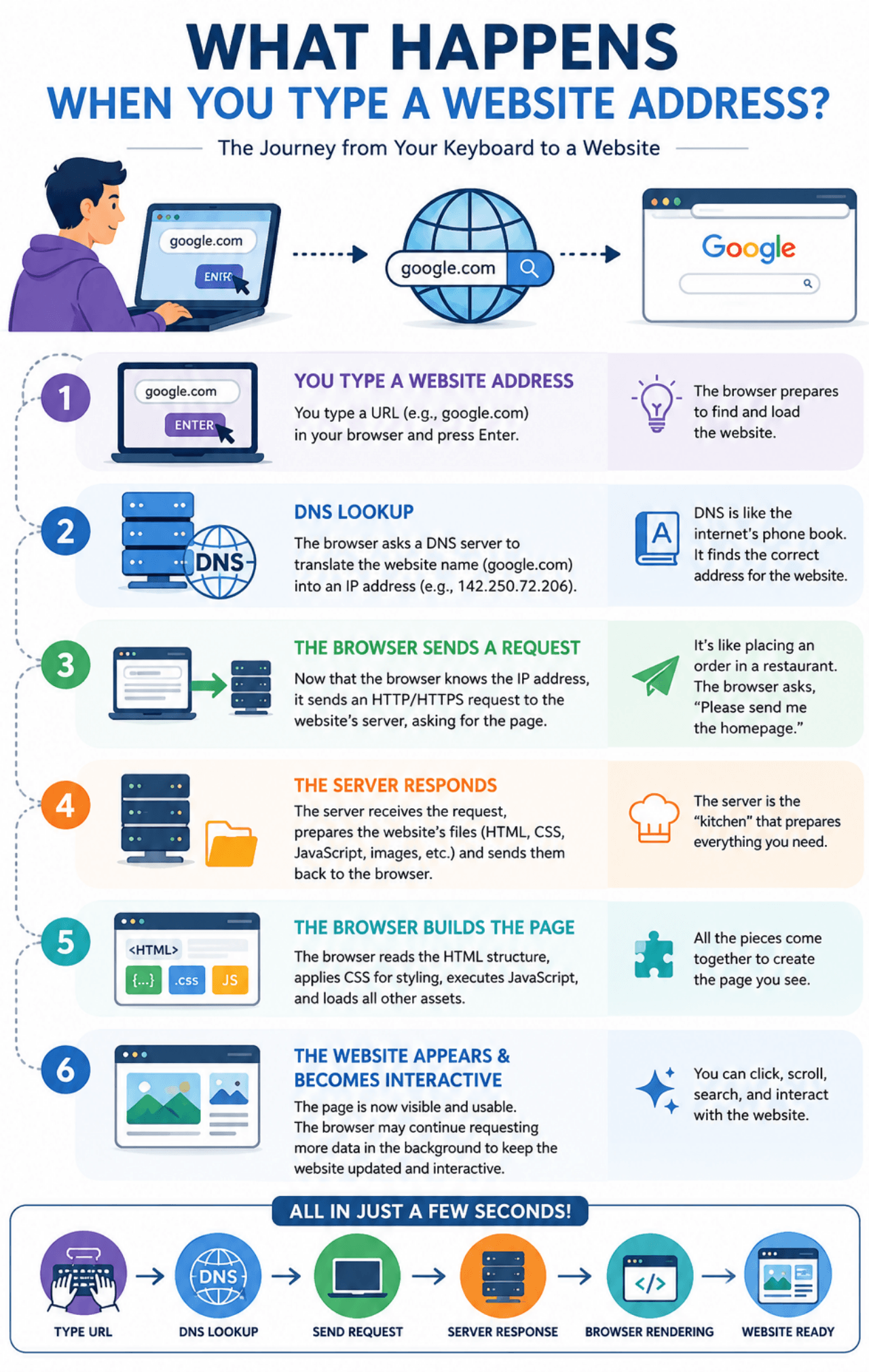
What actually happens when you type a website address and press Enter?
Whether you are browsing the net for Google, CNN, YouTube, Instagram, BBC, or your favorite online store, the process is pretty much the same. It happens so fast that we barely notice it, yet behind the scenes, a specific chain of events takes place. We thought about shedding some light on the issue.
What happens? Let us begin a new discovery journey with a simple exercise:
You type a website address
Imagine you are sitting at your desk.
You open your browser (Chrome or Mozilla) and type:
google.com
Afterwards, you press Enter.
Google appears almost instantly. Yet, one question emerges: “How does your computer know where Google is located?”
If you think about it, computers don't understand names like "google.com". They communicate through numbers, and as such, the question is valid.
Before anything else can happen, your browser needs to find the website's actual address.
DNS: The Internet's phone book
You could think of DNS (Domain Name System) as the internet's phone book, and an accurate one at that.
Not so long ago, if you wanted to call a friend, you looked up their number in a directory. DNS works in much the same way.
When you begin to type a website address, your browser asks (hypothetically):
"Can someone tell me where Google.com lives?"
DNS responds with the website's IP address, which is a unique numerical identifier used by computers to communicate.
Without DNS, browsing the internet would be a real nightmare. We would have to remember hundreds of long number sequences instead of simple names. Hard, no? It is.
Thankfully, DNS does all the heavy lifting for us.
Sending a request
When the browser learns where the website is located, it sends a request.
We have a useful analogy to consider ordering food in a restaurant.
• You are the customer.
• The browser is the waiter.
• The server is the kitchen.
You place your order:
"I'd like the Google homepage, please."
The browser carries this request across the internet to the server where the website is hosted.
This entire process takes just milliseconds. Fast and efficient. People who thought of the system did us a real favor.
The Server gets busy
Now the server receives the request. It has a strict job. It has to prepare everything needed to display the requested website.
Depending on the complexity of the site, the server might:
• retrieve information from a database;
• load images;
• process user information;
• generate dynamic content;
• verify permissions and security rules.
The server then packages everything together and sends it back to your browser.
This package mostly includes:
• HTML (the structure);
• CSS (the design);
• JavaScript (the functionality);
• images and multimedia files.
The browser builds the website
This is the moment when your browser receives a collection of files.
Let us keep the analogies going with yet another one. You open a flat-pack furniture box.
All the parts are there, but they still need to be assembled.
The browser starts putting everything together:
• HTML creates the structure;
• CSS adds colours, spacing, and styling;
• JavaScript makes elements interactive;
• images and media files are displayed.
In just seconds, a complete website appears on your screen.
Menus work just as the owner intended. Buttons respond to your commands. Images load without problems and the page becomes fully functional.
Why does it feel instant?
The intriguing part of the process is that it happens in less than a second.
Thousands of kilometers of cables, powerful servers, complex software systems, and browser technologies work together to create what feels like a simple experience.
We get to see the outcome.
Developers know and see the layers and connections that make everything possible. Regular users, not so much.
At Newroco, understanding these sublime processes helps us build stronger websites, smooth applications, and great digital experiences. More importantly, it gives us the unique ability to explain technology in analogies (hopefully, the good ones).
The next time you press enter, take a second to appreciate what happens behind the scenes. Well, don’t do it every single time you visit a new website, just one in a while.
A DNS server finds the destination.
A browser sends a request.
A server prepares a response.
The browser assembles everything into a usable website. Remember that every step takes mere seconds.
The bottom line is that technology is not magic.